Nathan Jones

“Design is how it works.”

Steve Jobs

I think about that line every day. A good experience comes from the whole system: the data model, the API, the loading states and the pixels. I design the screens and build what runs under them, because solid engineering is what keeps people coming back.

01 · Solo project

Shelf Snapper: point a phone at a bookshelf and get the books you'd actually read

Bookstores, libraries and friends' shelves hold hundreds of spines you can't look up one at a time. Shelf Snapper reads them all from one photo and ranks them against your taste. I designed it, built it and run it alone.

Role
Design, iOS and web, backend
Stack
React Native, Expo, Next.js, Convex, Claude vision
Status
TestFlight beta · shelfsnapper.com

Problem

Standing in front of a shelf, you skim spines and pick by cover. Looking each title up in Goodreads takes a minute per book, so nobody does it for more than two or three. The good book on the bottom shelf never gets a look.

Decisions

  1. Full case study coming soon

    Screens and design notes are on the way. Until then, the demo video on shelfsnapper.com shows the app in use.

Result

Shelf Snapper is in TestFlight beta. The landing page at shelfsnapper.com has a demo video.
02 · WorkBoard

Giving WorkBoard's AI agents a place to put their work

Gen 1 agents answered inside a chat thread. In Gen 2, each agent gets a second panel where the thing it's building stays in view while you talk to it. I designed the UX and built the artifact system end to end.

Role
Product designer and frontend tech lead
Stack
React, TypeScript, LangGraph
Status
Live, and the hero of workboard.com
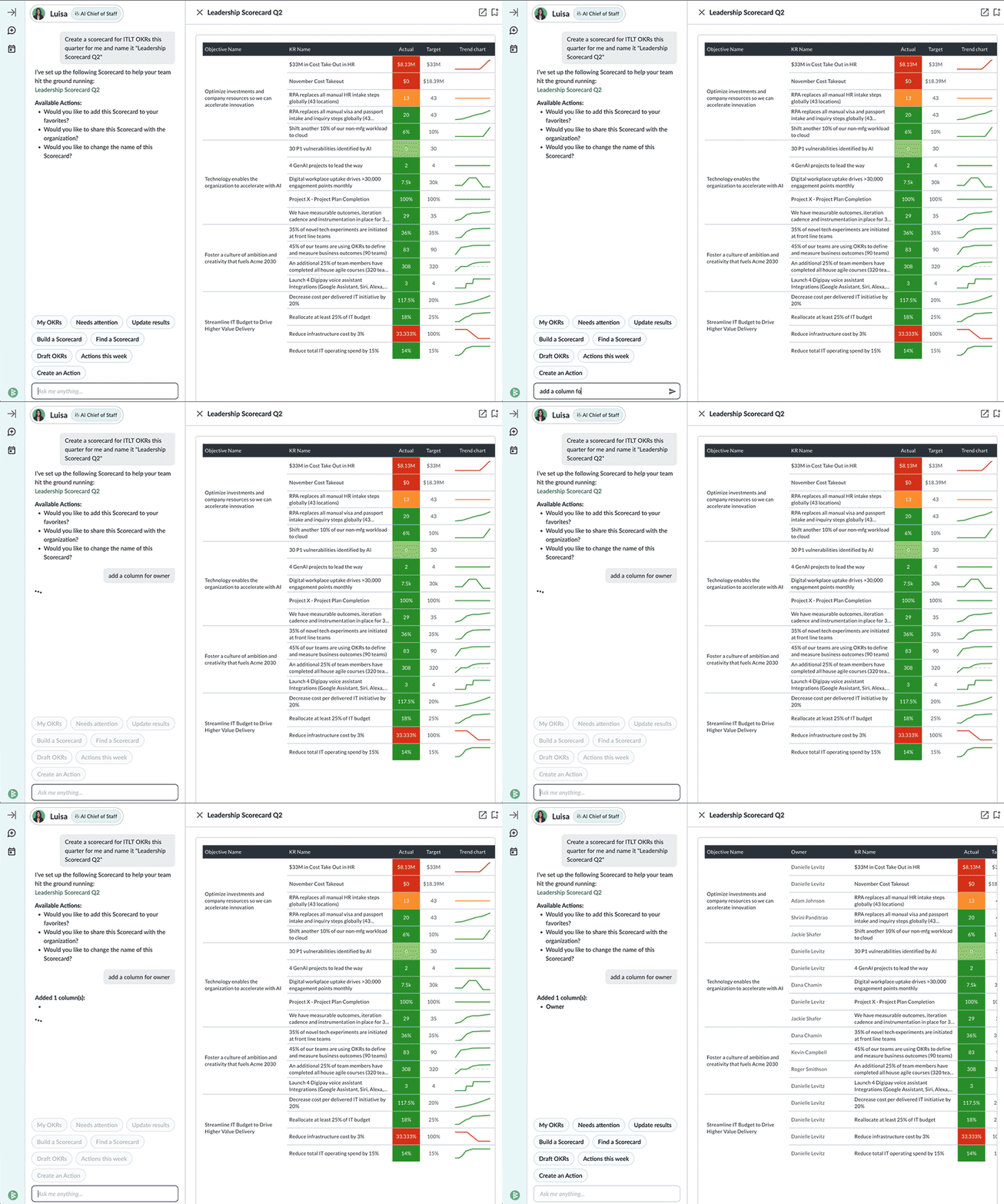
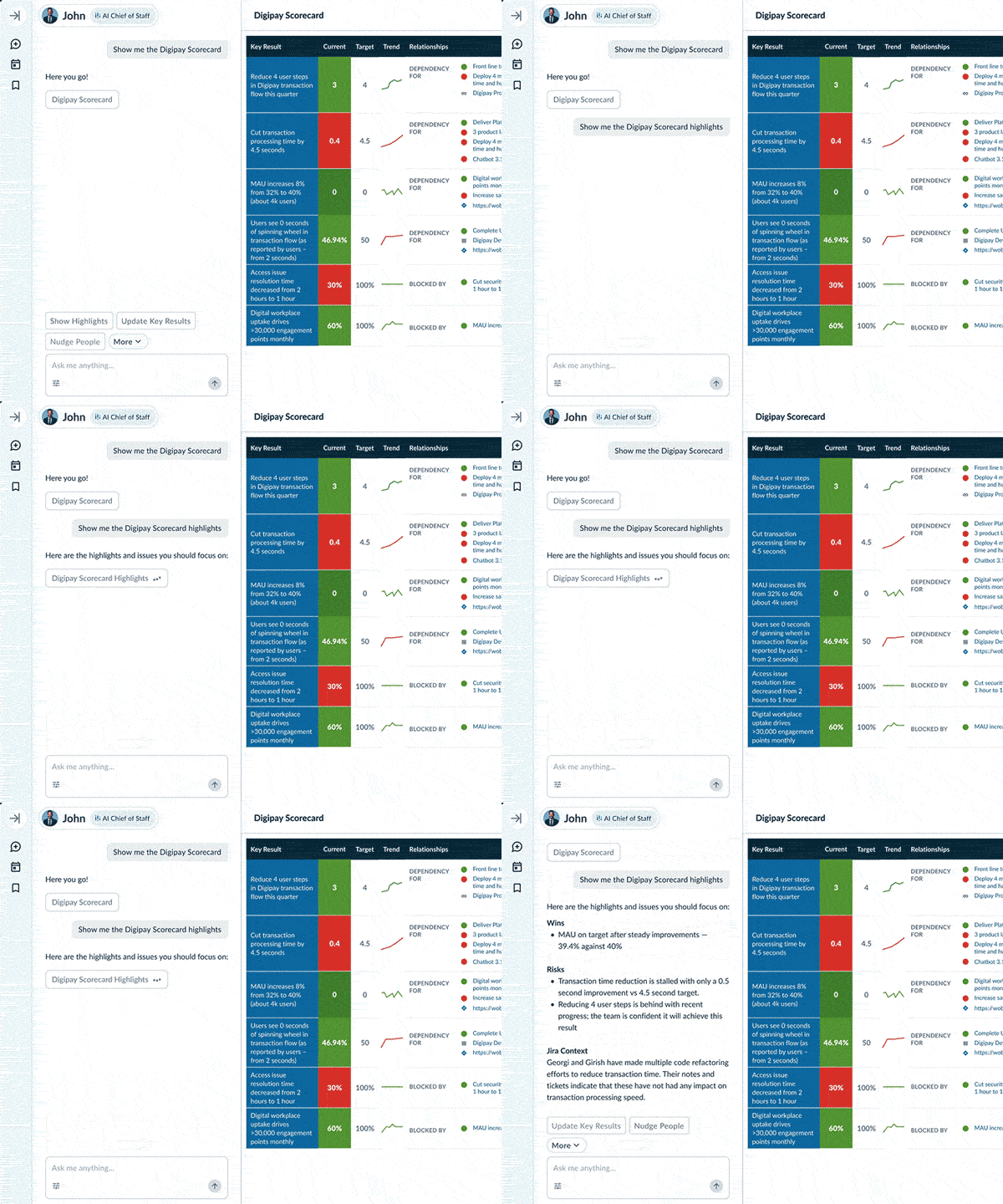
A WorkBoard agent highlights rows in a scorecard shown in a side panel next to the chat
Gen 2 on the workboard.com homepage, 2026. Image: WorkBoard.

Problem

Gen 1 agents rendered results inline, in the chat. That worked for a sentence. It broke down for Scorecards, the large OKR grids customers care most about. A wide grid squeezed into a chat bubble, and it scrolled away as soon as you asked a follow-up.

Decisions

  1. Prove it inside Gen 1 first

    I shipped an easter egg: shift-click a Scorecard link in chat and it opens in a side panel instead of inline. That put the idea in front of stakeholders in a live demo, not a mockup. I wrote up the UX problems it solved, and that write-up became the standard behind the Gen 2 initiative a few months later.

    An agent adds a column to a Leadership Scorecard open in a side panel
    The side-panel Scorecard as it shipped. Image: WorkBoard.
  2. Split the conversation from the output

    Talk goes on the left and the artifact goes on the right. When a reply changes the artifact, the thread shows a short marker instead of repeating the whole draft.

    Agent chat
    Conversation
    Updated draft
    Artifact
    Gen 1Gen 2
    Schematic, redrawn for this page. Drag or use the arrow keys to compare.
  3. Make the artifact an object, not a message

    I built the Artifact system that carries agent context from the agent backend to the panel. The agent reads and writes a structured artifact, so the UI can render it as a document and keep it in place across turns.

  4. Ship Gen 2 beside Gen 1

    Gen 1 stayed live in the same repo behind a feature flag the whole time. I recomposed the UI so both generations share components, and the new data flow stayed backward compatible with Gen 1. That meant no fork and no big-bang cutover.

Result

Gen 2 is live, and it's the first thing on workboard.com. In my last six months there I was the designer for this UX and also ran its QA and releases.

03 · WorkBoard

OKR Canvas: a shared board that became home for WorkBoard's first AI

Writing OKRs in WorkBoard was a clunky, solo form at the core of the platform. Alyx Klaiss sketched an “OKR Mega Shell” to fix it. I refined the concept and built it into a real-time canvas where teams draft OKRs together, and it went on to host all seven of the company's first AI features.

Role
Frontend engineer, design refinement
With
Alyx Klaiss, Oleg Serediuc
Stack
React, Socket.io, XState, Azure OpenAI, RTK Query, Material UI
Shipped
2023, in WorkBoard's generative AI launch
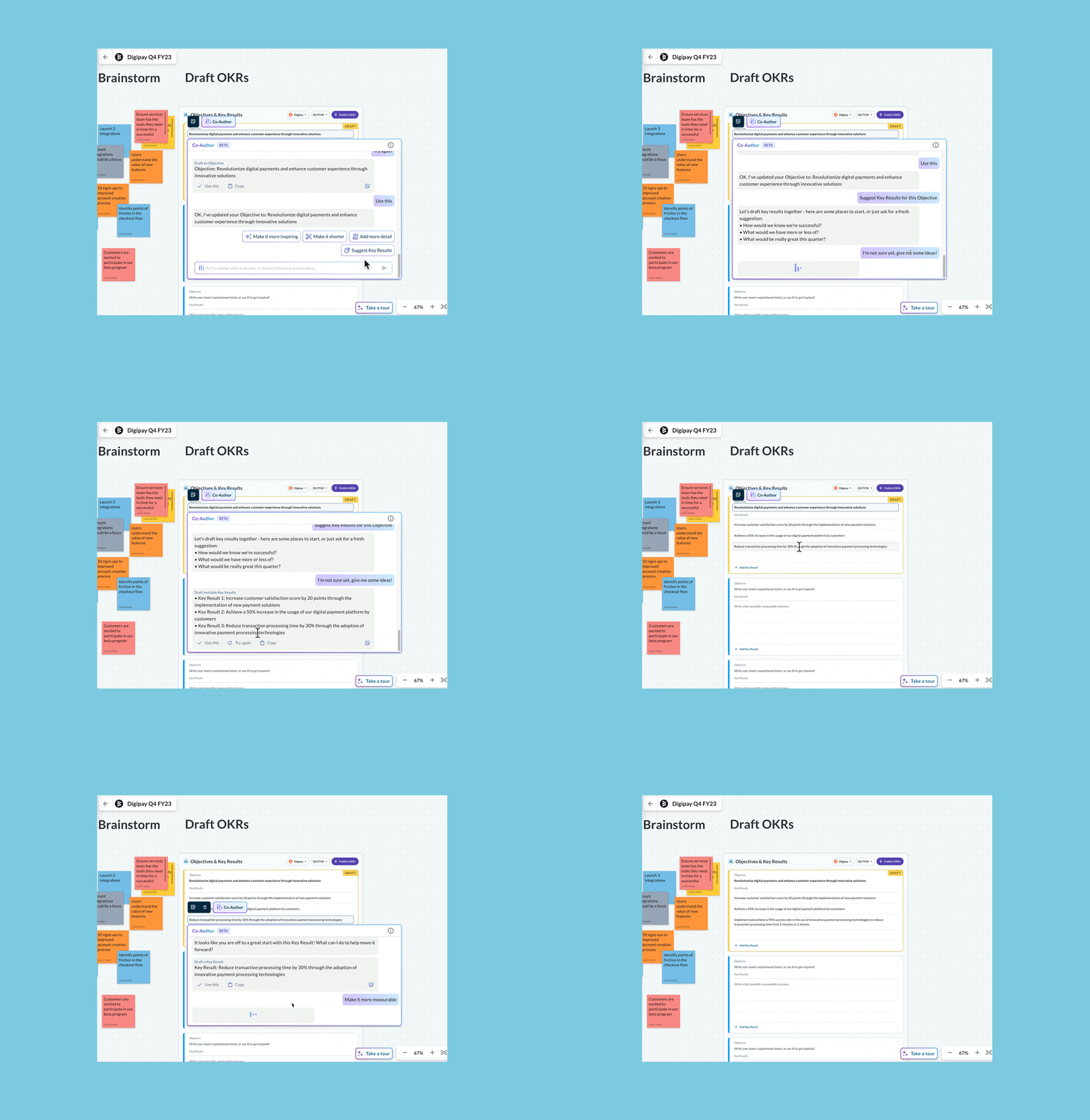
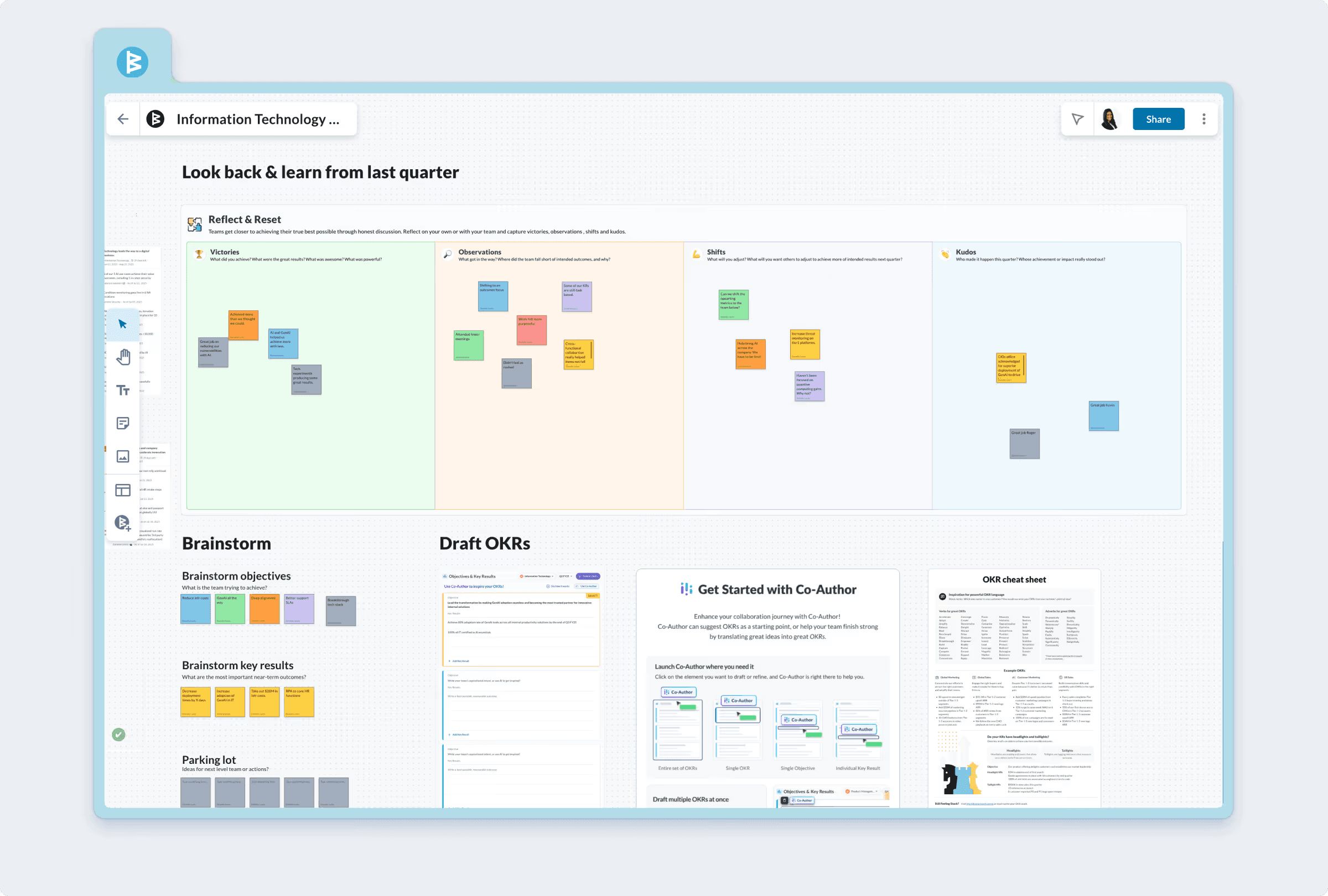
OKR Canvas with sticky notes, an objective card and the Co-Author panel drafting objectives
The canvas at launch, May 2023. Concept by Alyx Klaiss. Image: WorkBoard.

Problem

OKRs are the center of WorkBoard, and creating them meant a legacy form one person filled in alone. The real thinking happened somewhere else, in a meeting or on a whiteboard. Only the final text made it into the product, and the notes and reasoning behind it were lost.

Decisions

  1. Build the AI proof of concept for real, in an afternoon

    Before WorkBoard had any AI UX, I built Co-Author end to end in an afternoon as a working feature, not a mockup. Seeing it run changed leadership's AI strategy. Oleg Serediuc and I then designed the version that shipped, which became WorkBoard's first AI feature.

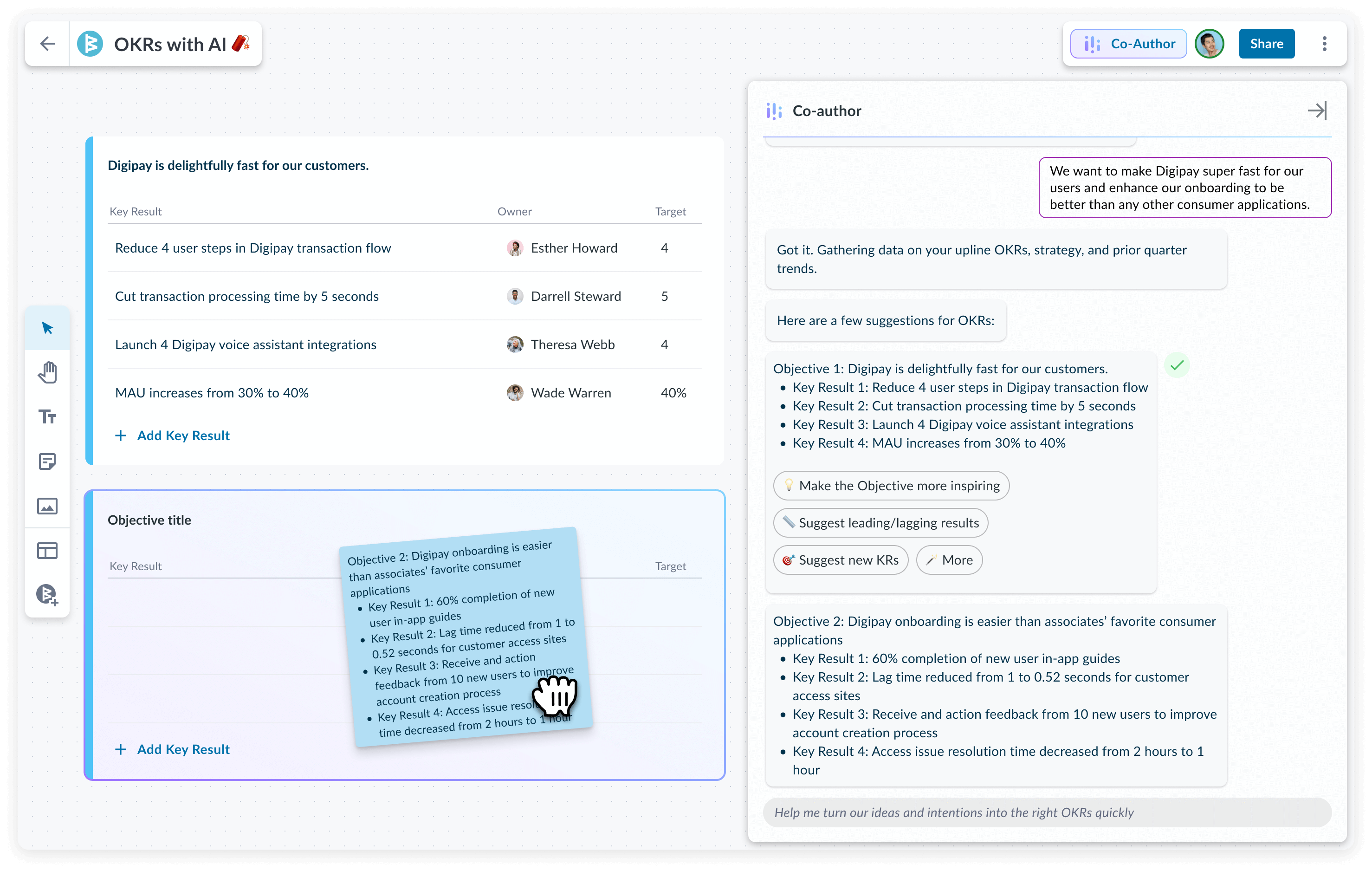
    Co-Author refines an objective next to brainstorm sticky notes on the canvas
    Co-Author refining a draft OKR beside the brainstorm. Final design with Oleg Serediuc. Image: WorkBoard.
  2. Chat and editor together, on the canvas

    Co-Author opens as a chat on top of an editor, right on the canvas stage. You ask for a draft in plain words, then edit the result directly instead of prompting again. The notes the OKR came from stay in view.

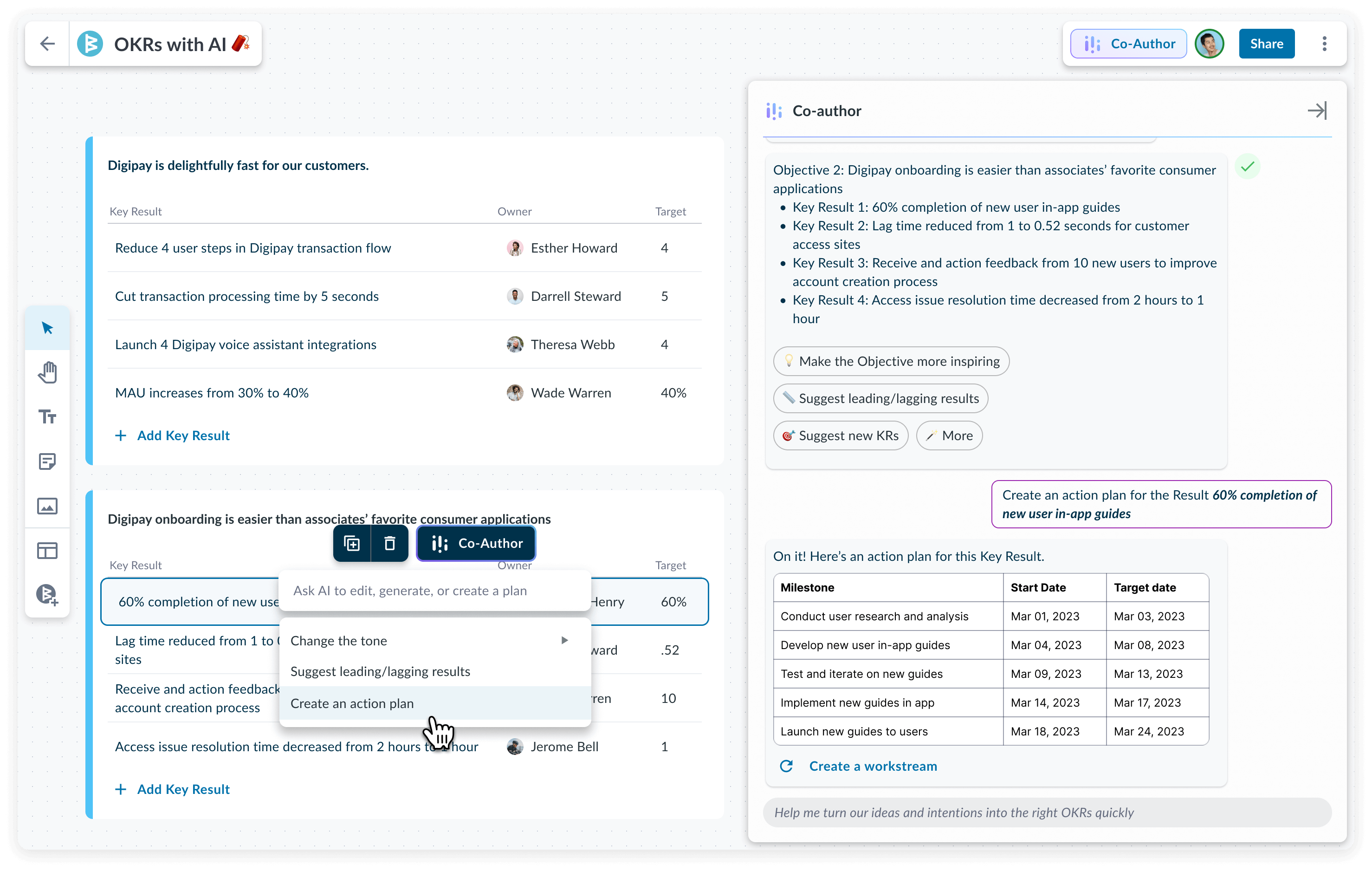
    Co-Author generating an action plan for a key result on the canvas
    Co-Author drafting an action plan for a key result. Image: WorkBoard.
  3. Give teams a place to look back first

    The “Look Back & Learn” object asks a team how last quarter went before it writes the next round of OKRs. It quickly became the core of the canvas. I designed it with Oleg Serediuc and shipped its first version to customers.

    A full canvas board with retro columns, a brainstorm area and draft OKRs
    Look Back & Learn, brainstorm and draft OKRs on one board. Designed with Oleg Serediuc. Image: WorkBoard.
  4. Build the canvas engine from state machines

    Selection, clipboard, dragging and the toolbar each run as their own XState machine, and the engine composes them. When a teammate's edit arrives over the socket in the middle of your drag, the board always has a defined state to be in.

Result

7

of WorkBoard's first AI features shipped inside the canvas

A legacy single-user form became a collaborative board, and the board became the home for the company's AI work. Co-Author, built in one afternoon as a proof of concept, was the first of those seven features.

Also at WorkBoard

One set of OKR components, and every page 51 to 75% faster

In 2024, Alyx Klaiss and I standardized WorkBoard's OKR components into one responsive design and published them as internal npm packages. Teams started adopting them across a fragmented legacy platform. When leadership pivoted to a standalone site for Agents, the components it needed already existed.

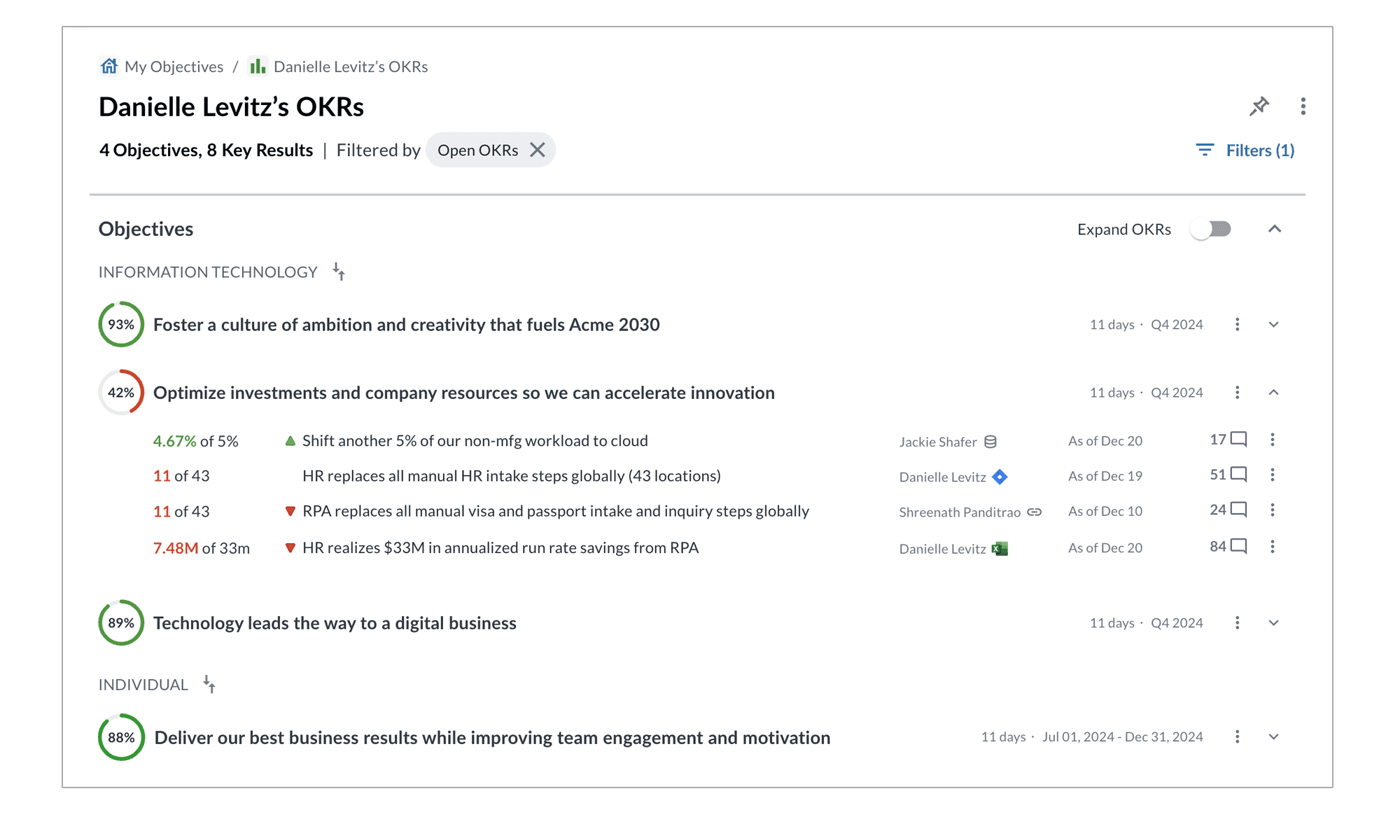
A My Objectives view built from the shared OKR components
Shared OKR components on the workboard.com homepage, 2025. Designed with Alyx Klaiss. Image: WorkBoard.

Result

51–75%

Shorter load time across all pages in the product

I led four cross-functional initiatives that shipped these components into legacy apps as Module Federation microfrontends, tested in Storybook and built to WAI-ARIA patterns. Lazy loading and tree-shaking during that work cut load time on every page.